# Zabbix


# 00 - Comparatif Zabbic Vs Grafana Vs Centreon

### **1) Objectif des outils**

#### Zabbix — Solution de supervision complète

- Outil tout en un : collecte, stockage, alertes, découverte réseau, dashboards
- SNMP natif, agentless ou via agent
- Très adapté aux infrastructures réseau (switchs, routeur, UPS, firewalls, serveurs...)
- Pensé pour la supervision IT classique (CPU, RAM, interfaces...)

#### Grafana — Plateforme de visualisation

- Outil centré sur les dashboards et la visualisation des données
- Ne collecte pas les données SNMP par lui-même (obligé de passer par Telegraf)
- Excellente ergonomie, très visuel

#### Centreon — Supervision orientée entreprise

- Surcouche de Nagios/Naemon avec interface web moderne
- Support SNMP via plugins, configuration plus complexe
- Très complet mais orienté grandes infrastructures IT
- Nécessite une architecture dédiée (base de données, broker...)

### **2) Supervision SNMP — Comparaison détaillée**

<div class="overflow-x-auto w-full px-2 mb-6" id="bkmrk-crit%C3%A8re-snmp-zabbix-"><table border="1" class="min-w-full border-collapse text-sm leading-[1.7] whitespace-normal" style="border-collapse: collapse; border-style: solid;"><thead class="text-left"><tr><th class="text-text-100 border-b-0.5 border-border-300/60 py-2 pr-4 align-top font-bold" scope="col">Critère SNMP</th><th class="text-text-100 border-b-0.5 border-border-300/60 py-2 pr-4 align-top font-bold" scope="col">Zabbix</th><th class="text-text-100 border-b-0.5 border-border-300/60 py-2 pr-4 align-top font-bold" scope="col">Grafana</th><th class="text-text-100 border-b-0.5 border-border-300/60 py-2 pr-4 align-top font-bold" scope="col">Centreon</th></tr></thead><tbody><tr><td class="border-b-0.5 border-border-300/30 py-2 pr-4 align-top">Support SNMP natif</td><td class="border-b-0.5 border-border-300/30 py-2 pr-4 align-top">Oui, complet (v1/v2c/v3)</td><td class="border-b-0.5 border-border-300/30 py-2 pr-4 align-top">Non, nécessite Telegraf/Prometheus</td><td class="border-b-0.5 border-border-300/30 py-2 pr-4 align-top">Via plugins Nagios</td></tr><tr><td class="border-b-0.5 border-border-300/30 py-2 pr-4 align-top">Poller SNMP intégré</td><td class="border-b-0.5 border-border-300/30 py-2 pr-4 align-top">Oui, polling interne (bulk requests, retry)</td><td class="border-b-0.5 border-border-300/30 py-2 pr-4 align-top">Non, dépend de SNMP Exporter ou Telegraf</td><td class="border-b-0.5 border-border-300/30 py-2 pr-4 align-top">Via Centreon Engine (plugins)</td></tr><tr><td class="border-b-0.5 border-border-300/30 py-2 pr-4 align-top">SNMP Traps</td><td class="border-b-0.5 border-border-300/30 py-2 pr-4 align-top">Support natif via snmptrapd</td><td class="border-b-0.5 border-border-300/30 py-2 pr-4 align-top">Via Telegraf SNMP Trap plugin uniquement</td><td class="border-b-0.5 border-border-300/30 py-2 pr-4 align-top">Via Centreon Trap, configuration manuelle</td></tr><tr><td class="border-b-0.5 border-border-300/30 py-2 pr-4 align-top">Alertes basées sur SNMP</td><td class="border-b-0.5 border-border-300/30 py-2 pr-4 align-top">Avancées (triggers, escalades)</td><td class="border-b-0.5 border-border-300/30 py-2 pr-4 align-top">Limitées (Prometheus Alertmanager)</td><td class="border-b-0.5 border-border-300/30 py-2 pr-4 align-top">Présentes mais complexes à configurer</td></tr><tr><td class="border-b-0.5 border-border-300/30 py-2 pr-4 align-top">Performances SNMP</td><td class="border-b-0.5 border-border-300/30 py-2 pr-4 align-top">Optimisé bulk requests à grande échelle</td><td class="border-b-0.5 border-border-300/30 py-2 pr-4 align-top">Dépend totalement de Telegraf/Prometheus</td><td class="border-b-0.5 border-border-300/30 py-2 pr-4 align-top">Dépend des plugins, moins optimisé</td></tr></tbody></table>

</div>### **3) Installation &amp; maintenance**

#### Zabbix

- Installation plus complexe
- Paramétrage parfois lourd mais complet
- Solution centralisée

#### Grafana

- Installation simple
- Peut tourner en conteneur Docker en quelques lignes
- Nécessite d'installer la stack SNMP complète

#### Centreon

- Installation complexe (dépendances Nagios, broker, base de données)
- Interface web moderne mais courbe d'apprentissage élevée
- Adapté aux équipes IT dédiées, surdimensionné pour un projet de taille réduite


### **4) Conclusion**

Zabbix a été retenu car il offre le meilleur compromis entre richesse fonctionnelle et simplicité de déploiement pour notre infrastructure. Grafana est écarté pour l'absence de collecte SNMP native. Centreon, bien que complet, est surdimensionné pour le besoin du projet.

# 01 - Description

## **Matériels**

**VM Proxmox**

OS : Debian 13

RAM : 4Go

Processeur : 2

Stockage : 50Go

## **Identifiants**

Proxmox

- IRS-admin
- ieufdL

Debian-Zabbix

- root
- ieufdl
- real name (zabbix)
- [Z@bB/\*](mailto:Z@bB/*)

Asterisck

- Debian-Asterisck
- asterisck
- stjolorient

# 02 - Installation Zabbix

#### **Source :**

[https://www.libra-linux.com/blog/15-supervision-avec-zabbix-7-0-lts-sur-debian-ubuntu](https://www.libra-linux.com/blog/15-supervision-avec-zabbix-7-0-lts-sur-debian-ubuntu)

### **1) Installation du serveur Zabbix**

#### **Prérequis**

- OS : Debian 12
- 2 Go de RAM , 1 CPU
- Accès root / sudo

#### **Ajout du dépôt Zabbix**

##### Pour Debian 12

```bash
wget https://repo.zabbix.com/zabbix/7.0/debian/pool/main/z/zabbix-release/zabbix-release_7.0-1+debian12_all.deb
sudo dpkg -i zabbix-release_7.0-1+debian12_all.deb
sudo apt update
```

##### Pour Ubuntu 22.04

```
wget https://repo.zabbix.com/zabbix/7.0/ubuntu/pool/main/z/zabbix-release/zabbix-release_7.0-1+ubuntu22.04_all.deb
sudo dpkg -i zabbix-release_7.0-1+ubuntu22.04_all.deb
sudo apt update
```

#### **Installer le serveur Zabbix + frontend + BDD**

```
sudo apt install zabbix-server-mysql zabbix-frontend-php zabbix-apache-conf \
zabbix-sql-scripts zabbix-agent mariadb-server
```

#### **Configurer MariaDB**

```
sudo mysql_secure_installation
```

Puis :

```
CREATE DATABASE zabbix CHARACTER SET utf8mb4 COLLATE utf8mb4_bin;
CREATE USER zabbix@localhost IDENTIFIED BY 'ieufdl';
GRANT ALL PRIVILEGES ON zabbix.* TO zabbix@localhost;
FLUSH PRIVILEGES;
```

Importer le schéma :

```
zcat /usr/share/zabbix-sql-scripts/mysql/server.sql.gz | mysql -uzabbix -p zabbix
```

#### **Configurer Zabbix**

Fichier /etc/zabbix/zabbix\_server.conf :

```
DBPassword=ieufdl
```

Ne pas oubliez de démarrer le service :)

```
sudo systemctl restart zabbix-server zabbix-agent apache2
sudo systemctl enable zabbix-server zabbix-agent apache2
```

#### **Accéder à l’interface web**

Accéder à : http://&lt;IP\_serveur&gt;/zabbix

Identifiants initiaux :

 Login : Admin

 Mot de passe : zabbix

[![zabbix.png](https://wiki-matheo.kermorvant.fr/uploads/images/gallery/2026-03/scaled-1680-/zabbix.png)](https://wiki-matheo.kermorvant.fr/uploads/images/gallery/2026-03/zabbix.png)

# 03 - Installation Client Zabbix

### **1) Installation du client Zabbix**

#### **Installation de l'agent sur la machine Client**

```
wget https://repo.zabbix.com/zabbix/6.4/debian/pool/main/z/zabbix-release/zabbix-release_6.4-1+debian12_all.deb
sudo dpkg -i zabbix-release_6.4-1+debian12_all.deb
sudo apt update
sudo apt install -y zabbix-agent2
```

#### **Configuration de l'agent**

Afin de connecter votre machine au serveur Zabbix, il faut configurer celle-ci en indiquant l'adresse IP de votre serveur Zabbix.

```
Server=<IP_de_ton_Zabbix>
ServerActive=<IP_de_ton_Zabbix>
Hostname=Debian-Asterisk
```

<p class="callout info">Le fichier à modifier est le suivant : /etc/zabbix/zabbix\_agent2.conf</p>

#### **Scripts de collecte Asterisk**

Voici un script vous permettant de collecter les données de votre machine pour les envoyer à votre serveur Zabbix.

```bash
#!/bin/bash
case "$1" in
  active_calls)
    sudo asterisk -rx "core show channels" | grep "active call" | awk '{print $1}'
    ;;
  registered_peers)
    sudo asterisk -rx "pjsip show contacts" | grep "Avail" | wc -l
    ;;
  unavail_peers)
    sudo asterisk -rx "pjsip show contacts" | grep "Unavail\|NonQual" | wc -l
    ;;
  service_status)
    systemctl is-active asterisk | grep -c "active"
    ;;
esac
```

<p class="callout info">Le fichier à modifier est le suivant : /etc/zabbix/zabbix\_agent2.conf</p>

N'oubliez pas de rendre le fichier exécutable avec la commande suivante :

```
sudo chmod +x /etc/zabbix/scripts/asterisk_stats.sh
```

#### **Ajouter les UserParamèters**

Ajouter le contenu ci-dessous à la fin du fichier "**/etc/zabbix/zabbix\_agent2.conf**" afin d'ajouter les UserParameters".

```bash
UserParameter=asterisk.active_calls,/etc/zabbix/scripts/asterisk_stats.sh active_calls
UserParameter=asterisk.registered_peers,/etc/zabbix/scripts/asterisk_stats.sh registered_peers
UserParameter=asterisk.unavail_peers,/etc/zabbix/scripts/asterisk_stats.sh unavail_peers
UserParameter=asterisk.service_status,/etc/zabbix/scripts/asterisk_stats.sh service_status
```

Puis :

Activer et relancer votre client Zabbix.

```
sudo systemctl enable zabbix-agent2
sudo systemctl restart zabbix-agent2
```

#### **Autoriser Zabbix à lancer Asterisk**

```bash
sudo visudo
```

Ajouter :
```
zabbix ALL=(ALL) NOPASSWD: /usr/sbin/asterisk
```

# 04 - Configuration

### **1) Configuration**

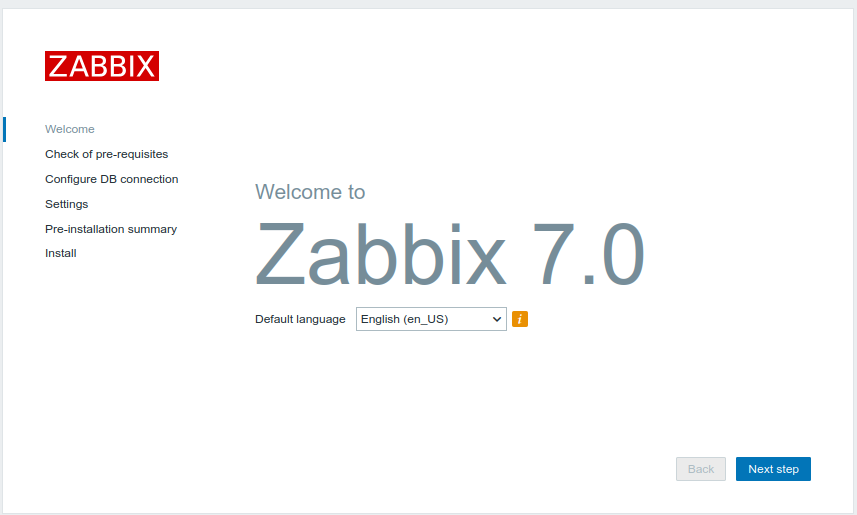
#### **Langue**

Une fois sur l'interface web, la configuration de Zabbix commence. Vous commencerez par simplement choisir votre langue.

[![zabbix.png](https://wiki-matheo.kermorvant.fr/uploads/images/gallery/2026-03/scaled-1680-/zabbix.png)](https://wiki-matheo.kermorvant.fr/uploads/images/gallery/2026-03/zabbix.png)
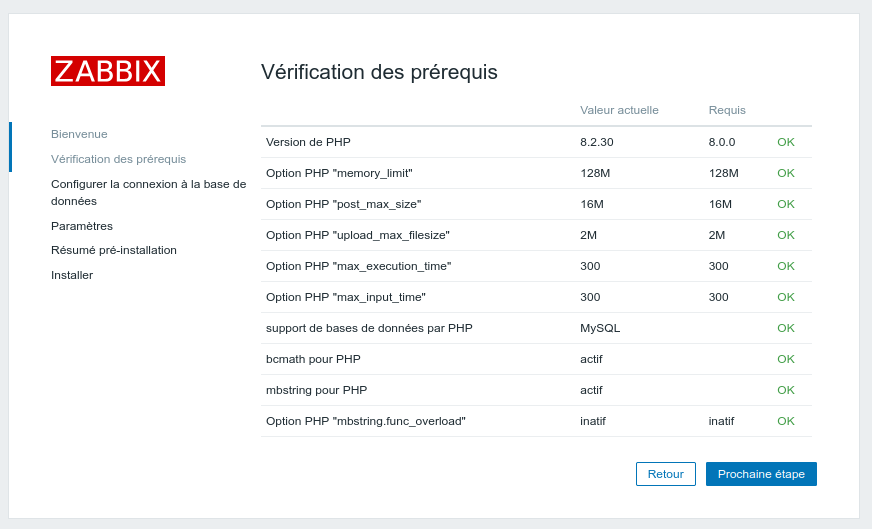
#### **Vérification des Prérequis**

A cette étape, vous n'aurez besoin que de vérifié que tous les prérequis sont bien "OK".

[![1.png](https://wiki-matheo.kermorvant.fr/uploads/images/gallery/2026-03/scaled-1680-/1.png)](https://wiki-matheo.kermorvant.fr/uploads/images/gallery/2026-03/1.png)
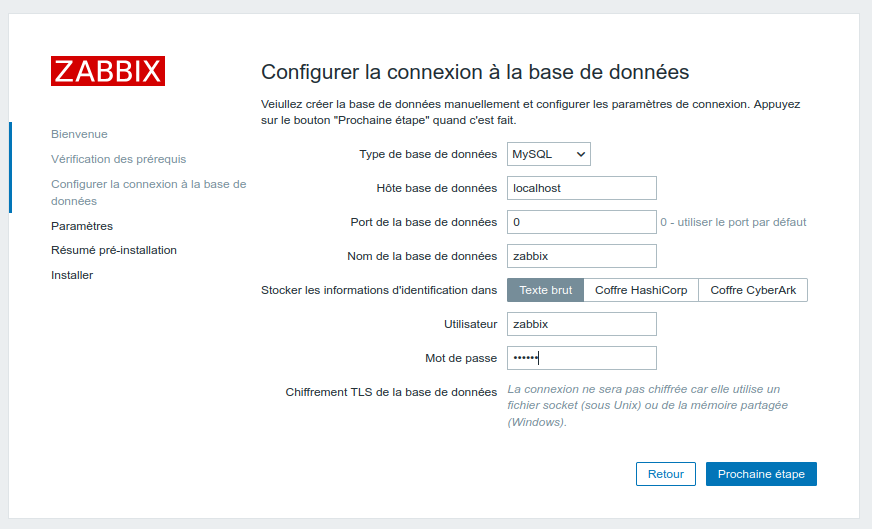
#### **Configuration de la connexion à la BDD**

A cette étapes, vous devrez remplir les différentes informations pour que la connexion entre Zabbix et la base de données se déroule correctement.


<p class="callout warning">Pensé a bien noté ces identifiant dans un gestionnaire de mot de passe !!!</p>


[![2.png](https://wiki-matheo.kermorvant.fr/uploads/images/gallery/2026-03/scaled-1680-/2.png)](https://wiki-matheo.kermorvant.fr/uploads/images/gallery/2026-03/2.png)

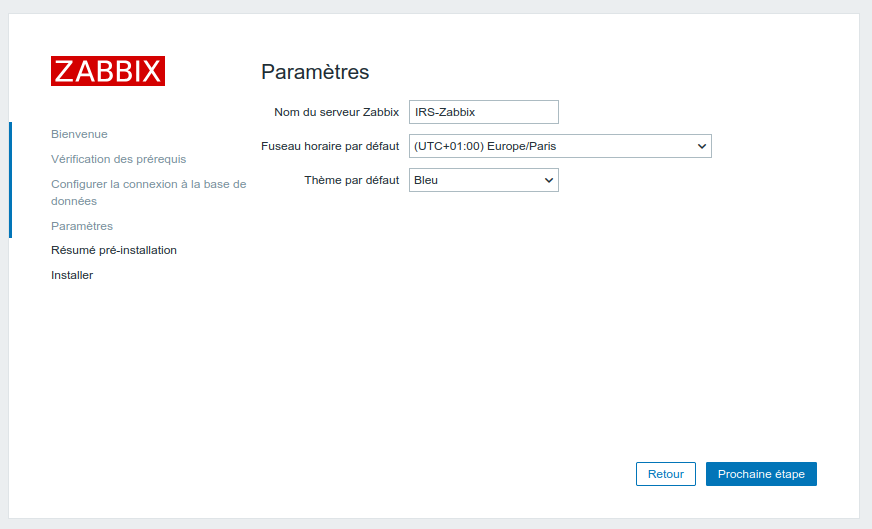
#### **Paramétrage**

Ici vous n'aurez cas remplir le nom de votre serveur, son fuseau horaire par defaut (pourras être changé plus tard) et si vous le souhaitez un thème.

[![3.png](https://wiki-matheo.kermorvant.fr/uploads/images/gallery/2026-03/scaled-1680-/3.png)](https://wiki-matheo.kermorvant.fr/uploads/images/gallery/2026-03/3.png)
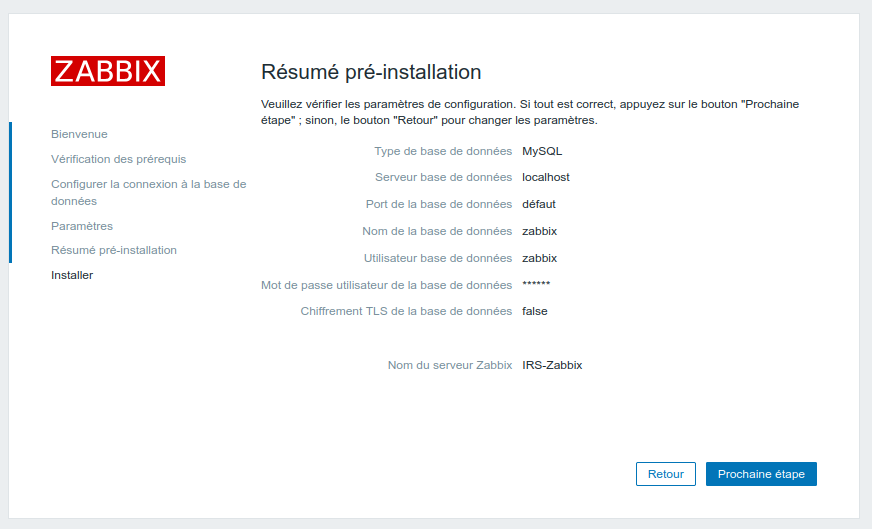
#### **Résumé**

Pour finir, vous aurez un résumé de pré-installation, n'hésitez pas à stocker les informations qui pourraient être utilisées plus tard.

[![4.png](https://wiki-matheo.kermorvant.fr/uploads/images/gallery/2026-03/scaled-1680-/4.png)](https://wiki-matheo.kermorvant.fr/uploads/images/gallery/2026-03/4.png)
#### **Connexion**

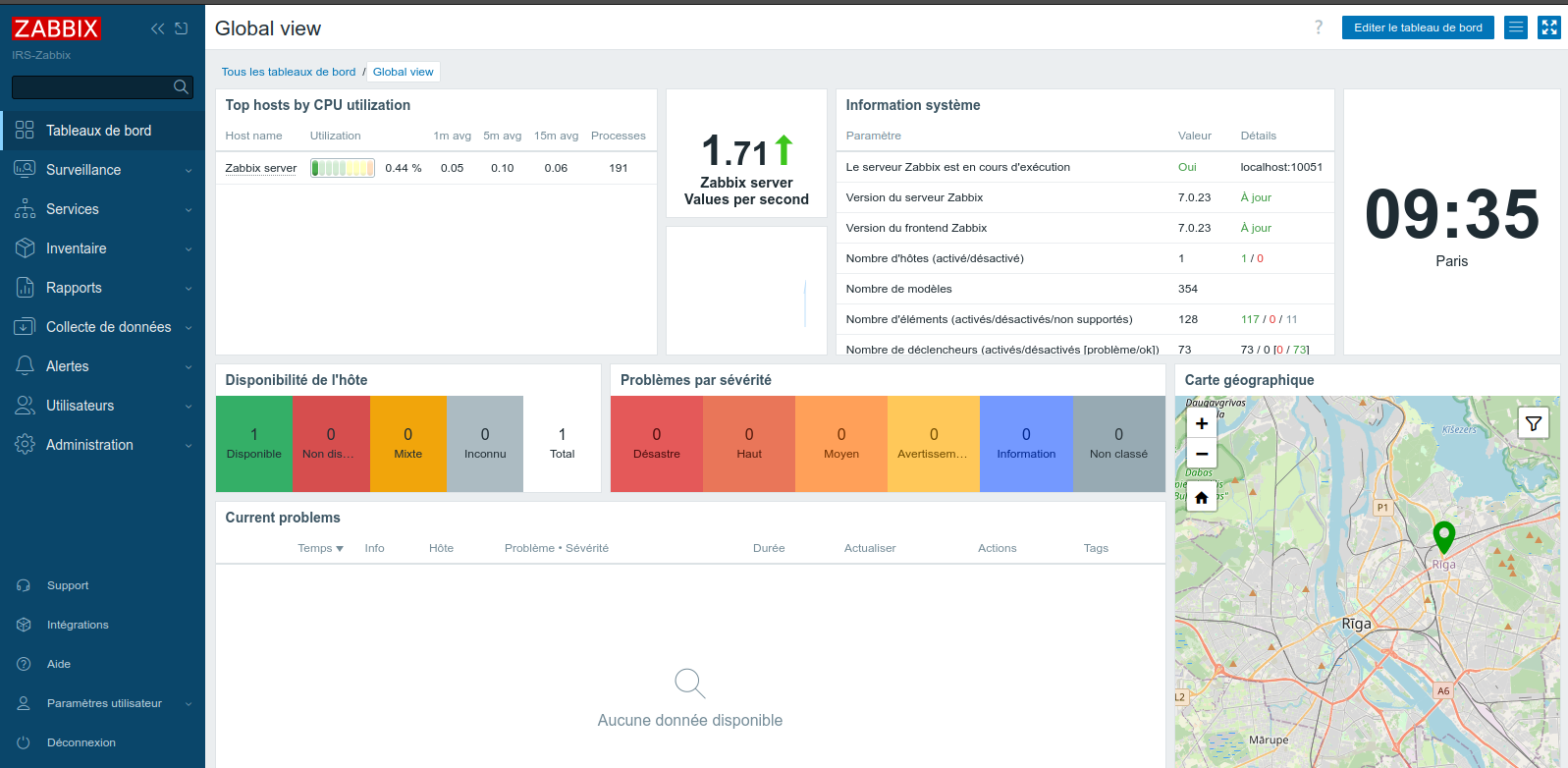
Une fois ces étapes réalisées, vous aurez accès à l'interface web de Zabbix.

Identifiant par défaut :

- Login : Admin
- Mdp : zabbix

- [![6.png](https://wiki-matheo.kermorvant.fr/uploads/images/gallery/2026-03/scaled-1680-/6.png)](https://wiki-matheo.kermorvant.fr/uploads/images/gallery/2026-03/6.png)
# 05 - Dashboard

## **1) Tableau de bord - Supervision VoIP**

Ce tableau de bord supervise le serveur Asterisk 18 (VM 192.168.10.69) ainsi que les trois téléphones IP du projet. Les données sont collectées via SNMPv3 et complétées par des vérifications ICMP.

**Hôtes supervisés**

<table border="1" cellpadding="5" cellspacing="0" id="bkmrk-%C3%89quipement-adresse-i" style="border-collapse: collapse; width: 602px; border-spacing: 0px; border-color: rgb(0, 0, 0); border-style: solid;" width="602"><colgroup><col width="176"></col><col width="137"></col><col width="123"></col><col width="124"></col></colgroup><thead><tr><td bgcolor="#1b3a6b" style="border-color: rgb(0, 0, 0);" width="176"><span style="color: #ffffff;"><span style="font-family: Arial, serif;"><span style="font-size: small;">**Équipement**</span></span></span>

</td><td bgcolor="#1b3a6b" style="border-color: rgb(0, 0, 0);" width="137"><span style="color: #ffffff;"><span style="font-family: Arial, serif;"><span style="font-size: small;">**Adresse IP**</span></span></span>

</td><td bgcolor="#1b3a6b" style="border-color: rgb(0, 0, 0);" width="123"><span style="color: #ffffff;"><span style="font-family: Arial, serif;"><span style="font-size: small;">**Protocole**</span></span></span>

</td><td bgcolor="#1b3a6b" style="border-color: rgb(0, 0, 0);" width="124"><span style="color: #ffffff;"><span style="font-family: Arial, serif;"><span style="font-size: small;">**Template Zabbix**</span></span></span>

</td></tr></thead><tbody><tr><td bgcolor="#ffffff" style="border-color: rgb(0, 0, 0);" width="176"><span style="color: #111111;"><span style="font-family: Arial, serif;"><span style="font-size: small;">Asterisk 18 (VM)</span></span></span>

</td><td bgcolor="#ffffff" style="border-color: rgb(0, 0, 0);" width="137"><span style="color: #111111;"><span style="font-family: Arial, serif;"><span style="font-size: small;">192.168.10.69</span></span></span>

</td><td bgcolor="#ffffff" style="border-color: rgb(0, 0, 0);" width="123"><span style="color: #111111;"><span style="font-family: Arial, serif;"><span style="font-size: small;">SNMP v3 + ICMP</span></span></span>

</td><td bgcolor="#ffffff" style="border-color: rgb(0, 0, 0);" width="124"><span style="color: #111111;"><span style="font-family: Arial, serif;"><span style="font-size: small;">Linux by Zabbix agent</span></span></span>

</td></tr></tbody></table>

**Widget du tableau de bord**

<table border="1" cellpadding="5" cellspacing="0" id="bkmrk-widget-m%C3%A9trique-coll" style="border-collapse: collapse; width: 602px; border-spacing: 0px; border-color: #000000; border-style: solid;" width="602"><colgroup><col width="149"></col> <col width="203"></col> <col width="217"></col> </colgroup><thead><tr><td bgcolor="#1b3a6b" style="border-color: rgb(0, 0, 0);" width="149"><span style="color: #ffffff;"><span style="font-family: Arial, serif;"><span style="font-size: small;">**Widget**</span></span></span>

</td><td bgcolor="#1b3a6b" style="border-color: rgb(0, 0, 0);" width="203"><span style="color: #ffffff;"><span style="font-family: Arial, serif;"><span style="font-size: small;">**Métrique collectée**</span></span></span>

</td><td bgcolor="#1b3a6b" style="border-color: rgb(0, 0, 0);" width="217"><span style="color: #ffffff;"><span style="font-family: Arial, serif;"><span style="font-size: small;">**Seuil / Alerte**</span></span></span>

</td></tr></thead><tbody><tr><td bgcolor="#ffffff" style="border-color: rgb(0, 0, 0);" width="149"><span style="color: #111111;"><span style="font-family: Arial, serif;"><span style="font-size: small;">Statut ICMP Asterisk</span></span></span>

</td><td bgcolor="#ffffff" style="border-color: rgb(0, 0, 0);" width="203"><span style="color: #111111;"><span style="font-family: Arial, serif;"><span style="font-size: small;">Ping vers 192.168.10.69</span></span></span>

</td><td bgcolor="#ffffff" style="border-color: rgb(0, 0, 0);" width="217"><span style="color: #111111;"><span style="font-family: Arial, serif;"><span style="font-size: small;">Alerte si indisponible</span></span></span>

</td></tr><tr><td bgcolor="#f2f2f2" style="border-color: rgb(0, 0, 0);" width="149"><span style="color: #111111;"><span style="font-family: Arial, serif;"><span style="font-size: small;">Charge CPU serveur</span></span></span>

</td><td bgcolor="#f2f2f2" style="border-color: rgb(0, 0, 0);" width="203"><span style="color: #111111;"><span style="font-family: Arial, serif;"><span style="font-size: small;">system.cpu.util (% utilisé)</span></span></span>

</td><td bgcolor="#f2f2f2" style="border-color: rgb(0, 0, 0);" width="217"><span style="color: #111111;"><span style="font-family: Arial, serif;"><span style="font-size: small;">Alerte si &gt; 80 %</span></span></span>

</td></tr><tr><td bgcolor="#ffffff" style="border-color: rgb(0, 0, 0);" width="149"><span style="color: #111111;"><span style="font-family: Arial, serif;"><span style="font-size: small;">Mémoire RAM</span></span></span>

</td><td bgcolor="#ffffff" style="border-color: rgb(0, 0, 0);" width="203"><span style="color: #111111;"><span style="font-family: Arial, serif;"><span style="font-size: small;">vm.memory.size\[available\]</span></span></span>

</td><td bgcolor="#ffffff" style="border-color: rgb(0, 0, 0);" width="217"><span style="color: #111111;"><span style="font-family: Arial, serif;"><span style="font-size: small;">Alerte si &lt; 100 Mo libres</span></span></span>

</td></tr><tr><td bgcolor="#f2f2f2" style="border-color: rgb(0, 0, 0);" width="149"><span style="color: #111111;"><span style="font-family: Arial, serif;"><span style="font-size: small;">Uptime Asterisk</span></span></span>

</td><td bgcolor="#f2f2f2" style="border-color: rgb(0, 0, 0);" width="203"><span style="color: #111111;"><span style="font-family: Arial, serif;"><span style="font-size: small;">sysUpTime (SNMP OID .1.3.6.1.2.1.1.3.0)</span></span></span>

</td><td bgcolor="#f2f2f2" style="border-color: rgb(0, 0, 0);" width="217"><span style="color: #111111;"><span style="font-family: Arial, serif;"><span style="font-size: small;">Alerte si redémarrage</span></span></span>

</td></tr><tr><td bgcolor="#ffffff" style="border-color: rgb(0, 0, 0);" width="149"><span style="color: #111111;"><span style="font-family: Arial, serif;"><span style="font-size: small;">Statut téléphones IP</span></span></span>

</td><td bgcolor="#ffffff" style="border-color: rgb(0, 0, 0);" width="203"><span style="color: #111111;"><span style="font-family: Arial, serif;"><span style="font-size: small;">ICMP ping x3 postes</span></span></span>

</td><td bgcolor="#ffffff" style="border-color: rgb(0, 0, 0);" width="217"><span style="color: #111111;"><span style="font-family: Arial, serif;"><span style="font-size: small;">Alerte si poste injoignable</span></span></span>

</td></tr><tr><td bgcolor="#f2f2f2" style="border-color: rgb(0, 0, 0);" width="149"><span style="color: #111111;"><span style="font-family: Arial, serif;"><span style="font-size: small;">Appels actifs</span></span></span>

</td><td bgcolor="#f2f2f2" style="border-color: rgb(0, 0, 0);" width="203"><span style="color: #111111;"><span style="font-family: Arial, serif;"><span style="font-size: small;">Asterisk AMI / SNMP MIB</span></span></span>

</td><td bgcolor="#f2f2f2" style="border-color: rgb(0, 0, 0);" width="217"><span style="color: #111111;"><span style="font-family: Arial, serif;"><span style="font-size: small;">Informatif</span></span></span>

</td></tr></tbody></table>

[![image.png](https://wiki-matheo.kermorvant.fr/uploads/images/gallery/2026-06/scaled-1680-/b7Aimage.png)](https://wiki-matheo.kermorvant.fr/uploads/images/gallery/2026-06/b7Aimage.png)

## **2) Tableau de bord - Supervision Wi-Fi**

Ce tableau de bord supervise le point d'accès Cisco WAP150 (192.168.10.198) via SNMPv3 en mode authPriv (SHA-1 + DES). Le firmware a été mis à jour en version 1.1.4.0 pour corriger un bug qui empêchait la persistance des identifiants SNMPv3 SHA+DES.

**Hôtes supervisés**

<table border="1" cellpadding="5" cellspacing="0" id="bkmrk-%C3%89quipement-adresse-i-1" style="border-collapse: collapse; width: 602px; height: 94.3907px; border-spacing: 0px; border-color: #000000; border-style: solid;" width="602"><colgroup><col width="176"></col> <col width="123"></col> <col width="123"></col> <col width="137"></col> </colgroup><thead><tr style="height: 35.7969px;"><td bgcolor="#1b3a6b" style="height: 35.7969px; border-color: rgb(0, 0, 0);" width="176"><span style="color: #ffffff;"><span style="font-family: Arial, serif;"><span style="font-size: small;">**Équipement**</span></span></span>

</td><td bgcolor="#1b3a6b" style="height: 35.7969px; border-color: rgb(0, 0, 0);" width="123"><span style="color: #ffffff;"><span style="font-family: Arial, serif;"><span style="font-size: small;">**Adresse IP**</span></span></span>

</td><td bgcolor="#1b3a6b" style="height: 35.7969px; border-color: rgb(0, 0, 0);" width="123"><span style="color: #ffffff;"><span style="font-family: Arial, serif;"><span style="font-size: small;">**Protocole**</span></span></span>

</td><td bgcolor="#1b3a6b" style="height: 35.7969px; border-color: rgb(0, 0, 0);" width="137"><span style="color: #ffffff;"><span style="font-family: Arial, serif;"><span style="font-size: small;">**Template Zabbix**</span></span></span>

</td></tr></thead><tbody><tr style="height: 58.5938px;"><td bgcolor="#ffffff" style="height: 58.5938px; border-color: rgb(0, 0, 0);" width="176"><span style="color: #111111;"><span style="font-family: Arial, serif;"><span style="font-size: small;">Cisco WAP150</span></span></span>

</td><td bgcolor="#ffffff" style="height: 58.5938px; border-color: rgb(0, 0, 0);" width="123"><span style="color: #111111;"><span style="font-family: Arial, serif;"><span style="font-size: small;">192.168.10.198</span></span></span>

</td><td bgcolor="#ffffff" style="height: 58.5938px; border-color: rgb(0, 0, 0);" width="123"><span style="color: #111111;"><span style="font-family: Arial, serif;"><span style="font-size: small;">SNMPv3 authPriv</span></span></span>

</td><td bgcolor="#ffffff" style="height: 58.5938px; border-color: rgb(0, 0, 0);" width="137"><span style="color: #111111;"><span style="font-family: Arial, serif;"><span style="font-size: small;">Network Generic Device by SNMP</span></span></span>

</td></tr></tbody></table>

  
**Paramètres SNMPv3 configurés dans Zabbix**

<table border="1" cellpadding="5" cellspacing="0" id="bkmrk-param%C3%A8tre-valeur-ver" style="border-collapse: collapse; width: 602px; border-spacing: 0px; border-color: #000000; border-style: solid;" width="602"><colgroup><col width="202"></col> <col width="377"></col> </colgroup><thead><tr><td bgcolor="#1b3a6b" style="border-color: rgb(0, 0, 0);" width="202"><span style="color: #ffffff;"><span style="font-family: Arial, serif;"><span style="font-size: small;">**Paramètre**</span></span></span>

</td><td bgcolor="#1b3a6b" style="border-color: rgb(0, 0, 0);" width="377"><span style="color: #ffffff;"><span style="font-family: Arial, serif;"><span style="font-size: small;">**Valeur**</span></span></span>

</td></tr></thead><tbody><tr><td bgcolor="#ffffff" style="border-color: rgb(0, 0, 0);" width="202"><span style="color: #111111;"><span style="font-family: Arial, serif;"><span style="font-size: small;">Version SNMP</span></span></span>

</td><td bgcolor="#ffffff" style="border-color: rgb(0, 0, 0);" width="377"><span style="color: #111111;"><span style="font-family: Arial, serif;"><span style="font-size: small;">SNMPv3</span></span></span>

</td></tr><tr><td bgcolor="#f2f2f2" style="border-color: rgb(0, 0, 0);" width="202"><span style="color: #111111;"><span style="font-family: Arial, serif;"><span style="font-size: small;">Utilisateur</span></span></span>

</td><td bgcolor="#f2f2f2" style="border-color: rgb(0, 0, 0);" width="377"><span style="color: #111111;"><span style="font-family: Arial, serif;"><span style="font-size: small;">zabbix</span></span></span>

</td></tr><tr><td bgcolor="#ffffff" style="border-color: rgb(0, 0, 0);" width="202"><span style="color: #111111;"><span style="font-family: Arial, serif;"><span style="font-size: small;">Niveau de sécurité</span></span></span>

</td><td bgcolor="#ffffff" style="border-color: rgb(0, 0, 0);" width="377"><span style="color: #111111;"><span style="font-family: Arial, serif;"><span style="font-size: small;">authPriv</span></span></span>

</td></tr><tr><td bgcolor="#f2f2f2" style="border-color: rgb(0, 0, 0);" width="202"><span style="color: #111111;"><span style="font-family: Arial, serif;"><span style="font-size: small;">Protocole d'authentification</span></span></span>

</td><td bgcolor="#f2f2f2" style="border-color: rgb(0, 0, 0);" width="377"><span style="color: #111111;"><span style="font-family: Arial, serif;"><span style="font-size: small;">SHA-1</span></span></span>

</td></tr><tr><td bgcolor="#ffffff" style="border-color: rgb(0, 0, 0);" width="202"><span style="color: #111111;"><span style="font-family: Arial, serif;"><span style="font-size: small;">Protocole de chiffrement</span></span></span>

</td><td bgcolor="#ffffff" style="border-color: rgb(0, 0, 0);" width="377"><span style="color: #111111;"><span style="font-family: Arial, serif;"><span style="font-size: small;">DES</span></span></span>

</td></tr></tbody></table>

**Widget du tableau de bord**

<table border="1" cellpadding="5" cellspacing="0" id="bkmrk-widget-m%C3%A9trique-coll-1" style="border-collapse: collapse; width: 602px; height: 296.172px; border-spacing: 0px; border-color: #000000; border-style: solid;" width="602"><colgroup><col style="width: 157px;" width="149"></col> <col style="width: 214px;" width="203"></col> <col style="width: 229px;" width="217"></col> </colgroup><thead><tr style="height: 35.7969px;"><td bgcolor="#1b3a6b" style="height: 35.7969px; border-color: rgb(0, 0, 0);" width="149"><span style="color: #ffffff;"><span style="font-family: Arial, serif;"><span style="font-size: small;">**Widget**</span></span></span>

</td><td bgcolor="#1b3a6b" style="height: 35.7969px; border-color: rgb(0, 0, 0);" width="203"><span style="color: #ffffff;"><span style="font-family: Arial, serif;"><span style="font-size: small;">**Métrique collectée**</span></span></span>

</td><td bgcolor="#1b3a6b" style="height: 35.7969px; border-color: rgb(0, 0, 0);" width="217"><span style="color: #ffffff;"><span style="font-family: Arial, serif;"><span style="font-size: small;">**Seuil / Alerte**</span></span></span>

</td></tr></thead><tbody><tr style="height: 58.5938px;"><td bgcolor="#ffffff" style="height: 58.5938px; border-color: rgb(0, 0, 0);" width="149"><span style="color: #111111;"><span style="font-family: Arial, serif;"><span style="font-size: small;">Bande passante entrante</span></span></span>

</td><td bgcolor="#ffffff" style="height: 58.5938px; border-color: rgb(0, 0, 0);" width="203"><span style="color: #111111;"><span style="font-family: Arial, serif;"><span style="font-size: small;">ifInOctets (bits/s)</span></span></span>

</td><td bgcolor="#ffffff" style="height: 58.5938px; border-color: rgb(0, 0, 0);" width="217"><span style="color: #111111;"><span style="font-family: Arial, serif;"><span style="font-size: small;">Informatif</span></span></span>

</td></tr><tr style="height: 58.5938px;"><td bgcolor="#f2f2f2" style="height: 58.5938px; border-color: rgb(0, 0, 0);" width="149"><span style="color: #111111;"><span style="font-family: Arial, serif;"><span style="font-size: small;">Bande passante sortante</span></span></span>

</td><td bgcolor="#f2f2f2" style="height: 58.5938px; border-color: rgb(0, 0, 0);" width="203"><span style="color: #111111;"><span style="font-family: Arial, serif;"><span style="font-size: small;">ifOutOctets (bits/s)</span></span></span>

</td><td bgcolor="#f2f2f2" style="height: 58.5938px; border-color: rgb(0, 0, 0);" width="217"><span style="color: #111111;"><span style="font-family: Arial, serif;"><span style="font-size: small;">Informatif</span></span></span>

</td></tr><tr style="height: 35.7969px;"><td bgcolor="#ffffff" style="height: 35.7969px; border-color: rgb(0, 0, 0);" width="149"><span style="color: #111111;"><span style="font-family: Arial, serif;"><span style="font-size: small;">Statut ICMP</span></span></span>

</td><td bgcolor="#ffffff" style="height: 35.7969px; border-color: rgb(0, 0, 0);" width="203"><span style="color: #111111;"><span style="font-family: Arial, serif;"><span style="font-size: small;">Ping vers 192.168.10.198</span></span></span>

</td><td bgcolor="#ffffff" style="height: 35.7969px; border-color: rgb(0, 0, 0);" width="217"><span style="color: #111111;"><span style="font-family: Arial, serif;"><span style="font-size: small;">Alerte si indisponible</span></span></span>

</td></tr><tr style="height: 35.7969px;"><td bgcolor="#f2f2f2" style="height: 35.7969px; border-color: rgb(0, 0, 0);" width="149"><span style="color: #111111;"><span style="font-family: Arial, serif;"><span style="font-size: small;">Latence réseau</span></span></span>

</td><td bgcolor="#f2f2f2" style="height: 35.7969px; border-color: rgb(0, 0, 0);" width="203"><span style="color: #111111;"><span style="font-family: Arial, serif;"><span style="font-size: small;">Temps de réponse ICMP (ms)</span></span></span>

</td><td bgcolor="#f2f2f2" style="height: 35.7969px; border-color: rgb(0, 0, 0);" width="217"><span style="color: #111111;"><span style="font-family: Arial, serif;"><span style="font-size: small;">Alerte si &gt; 100 ms</span></span></span>

</td></tr><tr style="height: 35.7969px;"><td bgcolor="#ffffff" style="height: 35.7969px; border-color: rgb(0, 0, 0);" width="149"><span style="color: #111111;"><span style="font-family: Arial, serif;"><span style="font-size: small;">Uptime équipement</span></span></span>

</td><td bgcolor="#ffffff" style="height: 35.7969px; border-color: rgb(0, 0, 0);" width="203"><span style="color: #111111;"><span style="font-family: Arial, serif;"><span style="font-size: small;">sysUpTime (.1.3.6.1.2.1.1.3.0)</span></span></span>

</td><td bgcolor="#ffffff" style="height: 35.7969px; border-color: rgb(0, 0, 0);" width="217"><span style="color: #111111;"><span style="font-family: Arial, serif;"><span style="font-size: small;">Alerte si redémarrage</span></span></span>

</td></tr><tr style="height: 35.7969px;"><td bgcolor="#f2f2f2" style="height: 35.7969px; border-color: rgb(0, 0, 0);" width="149"><span style="color: #111111;"><span style="font-family: Arial, serif;"><span style="font-size: small;">Statut interface</span></span></span>

</td><td bgcolor="#f2f2f2" style="height: 35.7969px; border-color: rgb(0, 0, 0);" width="203"><span style="color: #111111;"><span style="font-family: Arial, serif;"><span style="font-size: small;">ifOperStatus (up/down)</span></span></span>

</td><td bgcolor="#f2f2f2" style="height: 35.7969px; border-color: rgb(0, 0, 0);" width="217"><span style="color: #111111;"><span style="font-family: Arial, serif;"><span style="font-size: small;">Alerte si interface down</span></span></span>

</td></tr></tbody></table>

[![image.png](https://wiki-matheo.kermorvant.fr/uploads/images/gallery/2026-06/scaled-1680-/JQNimage.png)](https://wiki-matheo.kermorvant.fr/uploads/images/gallery/2026-06/JQNimage.png)

Le tableau de bord Zabbix ci-dessus illustre concrètement le problème de connectivité rencontré avec le point d'accès WAP150. On observe que le widget Statut WAP-WiFi affiche Down via ICMP ping, que le graphique Bande passante wlan0 ne remonte aucune donnée, et que le widget Alertes WAP-WiFi signale un PROBLÈME actif depuis le 01/06/2026 à 13h09, sans date de récupération. Ces indicateurs confirment que Zabbix ne parvient pas à joindre le WAP150 en ICMP.

  
La cause identifiée est la suivante : lorsque le WAP150 est branché sur le switch Cisco, il provoque un crash de ce dernier, rendant l'ensemble du réseau du projet indisponible. Le switch redémarre alors automatiquement, ce qui coupe toute connectivité le temps du redémarrage. Le WAP150 est donc resté débranché du switch pour ne pas perturber les autres services du projet, ce qui explique l'absence totale de réponse ICMP et SNMP constatée dans Zabbix.

  
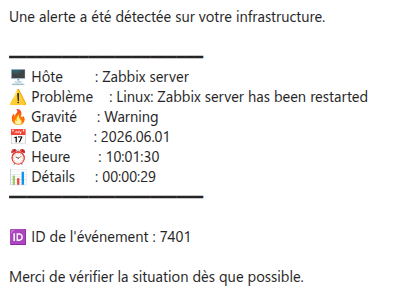
Une alerte email a bien été reçue par Zabbix lors de l'apparition du problème, confirmant que le système de notification fonctionne correctement. Cette alerte indiquait l'indisponibilité de l'hôte WAP-WiFi et la perte de l'ICMP ping, ce qui valide le bon fonctionnement du mécanisme de supervision même en situation de panne.

## **3) Bilan**  


<table border="1" cellpadding="5" cellspacing="0" id="bkmrk-%C3%89l%C3%A9ment-supervis%C3%A9-st" style="border-collapse: collapse; width: 602px; border-spacing: 0px; border-color: #000000; border-style: solid;" width="602"><colgroup><col width="216"></col> <col width="97"></col> <col width="257"></col> </colgroup><thead><tr><td bgcolor="#1b3a6b" style="border-color: rgb(0, 0, 0);" width="216"><span style="color: #ffffff;"><span style="font-family: Arial, serif;"><span style="font-size: small;">**Élément supervisé**</span></span></span>

</td><td bgcolor="#1b3a6b" style="border-color: rgb(0, 0, 0);" width="97"><span style="color: #ffffff;"><span style="font-family: Arial, serif;"><span style="font-size: small;">**Statut**</span></span></span>

</td><td bgcolor="#1b3a6b" style="border-color: rgb(0, 0, 0);" width="257"><span style="color: #ffffff;"><span style="font-family: Arial, serif;"><span style="font-size: small;">**Observations**</span></span></span>

</td></tr></thead><tbody><tr><td bgcolor="#ffffff" style="border-color: rgb(0, 0, 0);" width="216"><span style="color: #111111;"><span style="font-family: Arial, serif;"><span style="font-size: small;">Serveur Asterisk 18</span></span></span>

</td><td bgcolor="#ffffff" style="border-color: rgb(0, 0, 0);" width="97"><span style="color: #1a6b35;"><span style="font-family: Arial, serif;"><span style="font-size: small;">**Operationnel**</span></span></span>

</td><td bgcolor="#ffffff" style="border-color: rgb(0, 0, 0);" width="257"><span style="color: #111111;"><span style="font-family: Arial, serif;"><span style="font-size: small;">SNMP v3 + ICMP — dashboard actif</span></span></span>

</td></tr><tr><td bgcolor="#f2f2f2" style="border-color: rgb(0, 0, 0);" width="216"><span style="color: #111111;"><span style="font-family: Arial, serif;"><span style="font-size: small;">Téléphones IP (x2)</span></span></span>

</td><td bgcolor="#f2f2f2" style="border-color: rgb(0, 0, 0);" width="97"><span style="color: #1a6b35;"><span style="font-family: Arial, serif;"><span style="font-size: small;">**Operationnel**</span></span></span>

</td><td bgcolor="#f2f2f2" style="border-color: rgb(0, 0, 0);" width="257"><span style="color: #111111;"><span style="font-family: Arial, serif;"><span style="font-size: small;">ICMP — statut en temps réel</span></span></span>

</td></tr><tr><td bgcolor="#ffffff" style="border-color: rgb(0, 0, 0);" width="216"><span style="color: #111111;"><span style="font-family: Arial, serif;"><span style="font-size: small;">Cisco WAP150</span></span></span>

</td><td bgcolor="#ffffff" style="border-color: rgb(0, 0, 0);" width="97"><span style="color: #1a6b35;"><span style="font-family: Arial, serif;"><span style="font-size: small;">**Operationnel**</span></span></span>

</td><td bgcolor="#ffffff" style="border-color: rgb(0, 0, 0);" width="257"><span style="color: #111111;"><span style="font-family: Arial, serif;"><span style="font-size: small;">SNMPv3 authPriv — dashboard actif</span></span></span>

</td></tr><tr><td bgcolor="#f2f2f2" style="border-color: rgb(0, 0, 0);" width="216"><span style="color: #111111;"><span style="font-family: Arial, serif;"><span style="font-size: small;">Alertes Zabbix (email)</span></span></span>

</td><td bgcolor="#f2f2f2" style="border-color: rgb(0, 0, 0);" width="97"><span style="color: #b7510a;"><span style="font-family: Arial, serif;"><span style="font-size: small;">**<span style="color: #1a6b35;">Operationnel</span>**</span></span></span>

</td><td bgcolor="#f2f2f2" style="border-color: rgb(0, 0, 0);" width="257"><span style="color: #111111;"><span style="font-family: Arial, serif;"><span style="font-size: small;">Bloqué : pas d'accès internet sur VM Zabbix</span></span></span>

</td></tr><tr><td bgcolor="#ffffff" style="border-color: rgb(0, 0, 0);" width="216"><span style="color: #111111;"><span style="font-family: Arial, serif;"><span style="font-size: small;">Supervision PDU ATEN PE7208G</span></span></span>

</td><td bgcolor="#ffffff" style="border-color: rgb(0, 0, 0);" width="97"><span style="color: #c0392b;"><span style="font-family: Arial, serif;"><span style="font-size: small;">**Non fait**</span></span></span>

</td><td bgcolor="#ffffff" style="border-color: rgb(0, 0, 0);" width="257"><span style="color: #111111;"><span style="font-family: Arial, serif;"><span style="font-size: small;">A réaliser</span></span></span>

</td></tr><tr><td bgcolor="#f2f2f2" style="border-color: rgb(0, 0, 0);" width="216"><span style="color: #111111;"><span style="font-family: Arial, serif;"><span style="font-size: small;">Supervision APC Smart-UPS</span></span></span>

</td><td bgcolor="#f2f2f2" style="border-color: rgb(0, 0, 0);" width="97"><span style="color: #c0392b;"><span style="font-family: Arial, serif;"><span style="font-size: small;">**Non fait**</span></span></span>

</td><td bgcolor="#f2f2f2" style="border-color: rgb(0, 0, 0);" width="257"><span style="color: #111111;"><span style="font-family: Arial, serif;"><span style="font-size: small;">A réaliser</span></span></span>

</td></tr></tbody></table>

Concernant le PDU ATEN PE7208G et l'onduleur APC Smart-UPS, la supervision via Zabbix n'a pas pu être réalisée dans les délais du projet. Ces deux équipements supportent le protocole SNMP et auraient pu être intégrés selon la même méthode que le WAP150, en créant un hôte Zabbix avec le template adapté et en configurant les OID correspondants (état des prises pour le PDU, niveau de batterie et statut d'alimentation pour l'onduleur). Le temps consacré à la résolution des problèmes techniques rencontrés sur d'autres parties du projet (recompilation NET-SNMP, problème de connectivité ARP du portail captif) n'a pas permis d'avancer sur ces deux éléments. Leur supervision reste une évolution prioritaire à mettre en place en fin de projet si le temps le permet.

# 06 - Idées Dashboards

## **Asterisk / Téléphonie**

- Nombre d'appels actifs en temps réel
- Nombre de postes enregistrés (Avail/Unavail)
- Durée moyenne des appels
- État du service Asterisk (up/down)
- CPU/RAM de la VM Debian

## **PDU**

- Consommation électrique globale (Watts)
- Consommation par prise
- Température interne
- Alertes de surcharge
- État de chaque prise (on/off)

## **Onduleur (UPS)**

- Niveau de batterie (%)
- Autonomie restante (minutes)
- Tension d'entrée/sortie
- État de charge (sur secteur / sur batterie)
- Température batterie
- Alertes : batterie faible, coupure secteur

## **Point d'accès WiFi**

- Nombre de clients connectés
- Signal moyen
- Bande passante utilisée (upload/download)
- État des SSIDs
- Température

## **Dashboard global**

Un écran de synthèse avec :

- Carte du réseau avec statut vert/rouge de chaque équipement
- Graphes de consommation électrique sur 24h/7j
- Alertes actives en cours
- Disponibilité globale en %

# 07 - Messagerie

### **1) Installation de Postfix**

#### **Dépendance**

Installation des dépendance de postfix.

```bash
sudo apt update
sudo apt install postfix mailutils libsasl2-2 ca-certificates libsasl2-modules
```

#### **Configuration**

Pour configurer postfix, il faut compléter la configuration ci-dessous.

```bash
relayhost = [smtp.gmail.com]:587

smtp_use_tls = yes
smtp_sasl_auth_enable = yes
smtp_sasl_password_maps = hash:/etc/postfix/sasl_passwd
smtp_sasl_security_options = noanonymous
smtp_tls_CAfile = /etc/ssl/certs/ca-certificates.crt
```

<p class="callout info">Les informations ci-dessus son à compléter dans le fichier suivant : /etc/postfix/main.cf</p>

#### **Ajout identifiant Gmail**

Créer le fichier suivant :

```bash
sudo nano /etc/postfix/sasl_passwd
```

Il faut ajoute l'adresse email ainsi que le mot de passe :

```
[smtp.gmail.com]:587 projet-irs@gmail.com:TON_MOT_DE_PASSE_APP
```

<p class="callout warning">Il faut bien utiliser son **mot de passe d'application**, pas son vrai mot de passe</p>

#### **Sécurité**

```bash
sudo chmod 600 /etc/postfix/sasl_passwd
sudo postmap /etc/postfix/sasl_passwd
```

#### **Test envoi**

La commande suivante permet de tester l'envoie d'un mail.

```bash
echo "Test mail" | mail -s "Test Zabbix" projet-irs@gmail.com
```

### **2) Configuration de Zabbix**


#### **Connexion Mail**

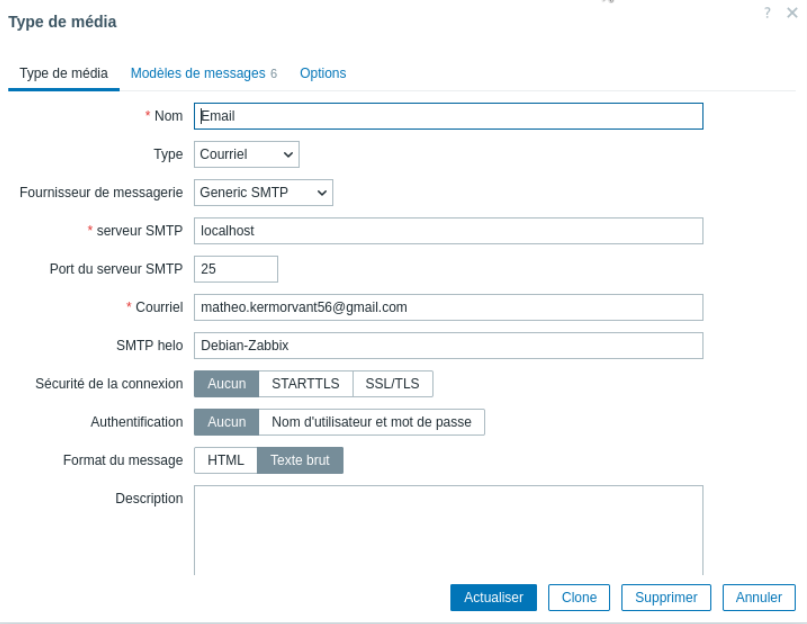
Dans l’interface web de **<span class="hover:entity-accent entity-underline inline cursor-pointer align-baseline"><span class="whitespace-normal">Zabbix</span></span>** :

- Va dans **Alertes → Types de média**
- Configure Email : 
    - SMTP server : `localhost`
    - SMTP helo : ton hostname
    - SMTP email : `projet-irs@gmail.com`

[![image.png](https://wiki-matheo.kermorvant.fr/uploads/images/gallery/2026-05/scaled-1680-/KQBimage.png)](https://wiki-matheo.kermorvant.fr/uploads/images/gallery/2026-05/KQBimage.png)
#### **Association Mail / utilisateur**

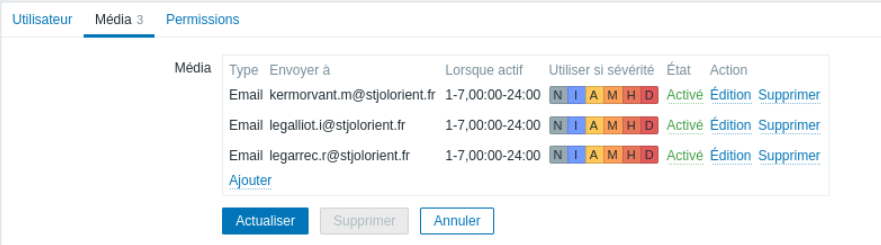
Afin que Zabbix sache à qui envoyé l'alerte, il faut configurer l'utilisateur avec l'adresse mail de destination.

Dans l’interface web de **<span class="hover:entity-accent entity-underline inline cursor-pointer align-baseline"><span class="whitespace-normal">Zabbix</span></span>** :

- Va dans **Utilisateurs → Utilisateurs**
- Configure Média dans l'utilisateur Admin:

[![image.png](https://wiki-matheo.kermorvant.fr/uploads/images/gallery/2026-05/scaled-1680-/Rkzimage.png)](https://wiki-matheo.kermorvant.fr/uploads/images/gallery/2026-05/Rkzimage.png)
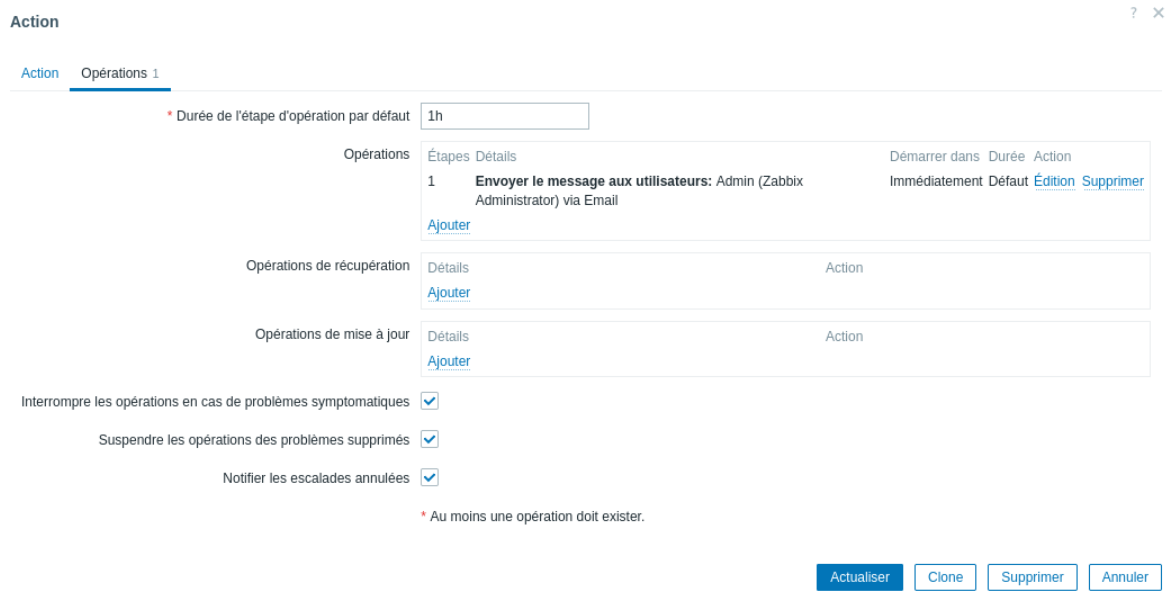
#### **Action**

Maintenant que tout est configuré, il faut maintenant créé une action.

Dans l’interface web de **<span class="hover:entity-accent entity-underline inline cursor-pointer align-baseline"><span class="whitespace-normal">Zabbix</span></span>** :

- Va dans **Alertes → Actions → Créé une actions**
- Configure l'action : 
    - Nom : `Alerte Problème`
    - Conditions : Le problème est supprimé : non
- Configure l'opération : 
    - Opérations : `Envoyer au utilisateur : Admin`

[![image.png](https://wiki-matheo.kermorvant.fr/uploads/images/gallery/2026-05/scaled-1680-/WUiimage.png)](https://wiki-matheo.kermorvant.fr/uploads/images/gallery/2026-05/WUiimage.png)
### **3) Résultat**

A partir de ce moment la, lorsqu'un problème est détecté une alerte est automatiquement envoyé au trois adresses configurés

[![image.png](https://wiki-matheo.kermorvant.fr/uploads/images/gallery/2026-06/scaled-1680-/image.png)](https://wiki-matheo.kermorvant.fr/uploads/images/gallery/2026-06/image.png)
### **4) Source**

[https://www.zabbix.com/documentation/6.0/fr/manual/quickstart/notification](https://www.zabbix.com/documentation/6.0/fr/manual/quickstart/notification)

https://www.zabbix.com/documentation/4.2/fr/manual/quickstart/notification#:~:text=La%20livraison%20des%20notifications%20est,marqu%C3%A9s%20d'un%20ast%C3%A9risque%20rouge.