05 - NoDogSplash
1) Qu'est ce que NoDogSplash
sudoNoDogSplash aptest installun gitlogiciel libmicrohttpd-devopen -ysource de portail captif léger, conçu pour les systèmes Linux embarqués. Un portail captif est un mécanisme réseau qui intercepte le trafic HTTP d'un client nouvellement connecté à un réseau Wi-Fi et le redirige vers une page web de bienvenue, avant de lui accorder un accès complet à internet ou aux ressources autorisées. Ce type de système est fréquemment rencontré dans les hôtels, aéroports, restaurants ou tout établissement proposant un accès Wi-Fi public.
Techniquement, NoDogSplash s'installe sur une machine Linux faisant office de passerelle (routeur) entre le réseau sans fil et le réseau en amont. Il exploite le pare-feu netfilter (iptables) du noyau Linux pour bloquer par défaut tout le trafic des clients non authentifiés, à l'exception des requêtes DNS et des connexions vers le portail lui-même. Lorsqu'un client tente d'accéder à n'importe quelle page web, NoDogSplash intercepte la requête et retourne une réponse de redirection HTTP 302 vers l'adresse de son interface web interne.
Après que l'utilisateur a accepté les conditions d'utilisation sur la page du portail, NoDogSplash ajoute dynamiquement une règle iptables autorisant le trafic de ce client spécifique (identifié par son adresse MAC). L'accès reste ouvert jusqu'à expiration de la session ou déconnexion.
2) Obligation légal
En France, toute personne physique ou morale proposant un accès à internet au public est soumise à des obligations légales définies par la loi n°2004-575 du 21 juin 2004 pour la Confiance dans l'Économie Numérique (LCEN), complétée par le décret n°2011-219 du 25 février 2011. Ces textes imposent à tout opérateur de réseau Wi-Fi ouvert de conserver pendant une durée d'un an les données de connexion de ses utilisateurs, notamment les adresses IP attribuées, les horodatages de connexion et de déconnexion, ainsi que les identifiants techniques permettant d'identifier le terminal utilisé.
Cette obligation vise à permettre aux autorités judiciaires de remonter jusqu'à l'auteur d'une infraction commise via le réseau en cas de réquisition.
Dans le cadre du projet IRS-SI, la mise en place du portail captif NoDogSplash répond directement à cette exigence. En interceptant chaque connexion et en enregistrant l'adresse MAC du terminal, l'adresse IP attribuée et l'horodatage de la session, la VM NoDogSplash permet à la PME fictive de disposer d'une traçabilité minimale conforme à la législation. Sans ce mécanisme, l'entreprise s'exposerait à des sanctions pénales en cas d'utilisation illicite de son réseau par un visiteur, faute de pouvoir fournir les éléments d'identification requis par les autorités.
3) Utilité dans le projet IRS-SI
Dans le projet IRS-SI, le réseau Wi-Fi est dédié aux visiteurs et invités de la PME fictive. Ce réseau est isolé du réseau de production par le VLAN 40. NoDogSplash y joue trois rôles complémentaires :
• Contrôle d'accès applicatif : même si un visiteur connaît le mot de passe WPA2, il ne peut pas naviguer sans valider le portail. Cela ajoute un second niveau d'authentification indépendant du chiffrement Wi-Fi.
• Responsabilisation juridique : en affichant des conditions d'utilisation que le visiteur doit accepter explicitement, l'entreprise se protège légalement en cas d'utilisation abusive du réseau.
• Point de journalisation : NoDogSplash peut enregistrer les connexions (adresse MAC, horodatage, durée de session), ce qui permet une traçabilité minimale conforme aux obligations légales françaises pour les opérateurs de réseaux Wi-Fi ouverts.
La VM NoDogSplash est déployée sur l'hyperviseur Proxmox avec deux interfaces réseau : ens18 connectée au VLAN 99 (LAN de gestion) et ens19 connectée au VLAN 40 (réseau Wi-Fi visiteurs) avec l'adresse 192.168.10.194/27. Elle constitue la passerelle par défaut de tous les clients Wi-Fi.
|
Caractéristique |
Détail |
|
Logiciel |
NoDogSplash (sources GitHub — branche master) |
|
Licence |
GNU GPL v2 |
|
OS hôte |
Debian 12 (Bookworm) |
|
Hyperviseur |
Proxmox VE |
|
Interface VLAN 40 |
ens19 — 192.168.10.194/27 |
|
Interface VLAN 99 |
ens18 — adresse DHCP (gestion) |
|
Port d'écoute portail |
TCP 2050 |
|
Démarrage |
Service systemd (nodogsplash.service) |
|
Rôle réseau |
Passerelle par défaut des clients VLAN 40 |
4) Installation depuis les sources GitHub
Clonage du dépôt
NoDogSplash est disponible sur GitHub. La branche master contient la version stable la plus récente. Le clonage s'effectue dans le répertoire de l'utilisateur courant.
cd /home/nodogsplash
git clone https://github.com/nodogsplash/nodogsplash.git
cd nodogsplash
cd nodogsplash
makeCompilation
sudoLa compilation utilise les outils standards de build Linux. Aucune option particulière n'est nécessaire : NoDogSplash détecte automatiquement libmicrohttpd si le paquet de développement est installé.
make

# En cas d'erreur liée à libmicrohttpd :
# Vérifier : dpkg -l | grep libmicrohttpd-dev
make installInstallation
La commande make install copie le binaire dans /usr/bin/ et les fichiers de configuration par défaut dans /etc/nodogsplash/.
make install

# Vérifier les fichiers installés :
ls /etc/nodogsplash/
which nodogsplash
nodogsplash --version
|
Fichier / Répertoire installé |
Contenu |
|
/usr/bin/nodogsplash |
Binaire principal |
|
/etc/nodogsplash/nodogsplash.conf |
Fichier de configuration principal |
|
/etc/nodogsplash/htdocs/ |
Pages HTML du portail (splash page) |
|
/etc/nodogsplash/htdocs/splash.html |
Page d'accueil affichée au visiteur |
|
/var/log/nodogsplash.log |
Fichier de log (créé au démarrage) |
5) Configuration de NoDogSplash
Le fichier de configuration principal se trouve dans /etc/nodogsplash/nodogsplash.conf. Il définit l'interface réseau sur laquelle NoDogSplash écoute, le port du portail, les règles de filtrage et les paramètres de session. Voici la configuration appliquée dans le projet IRS-SI :
#
# Nodogsplash Configuration File
#

# Parameter: GatewayInterface
# Default: NONE
#
# GatewayInterface is not autodetected, has no default, and must be set here.
# Set GatewayInterface to the interface on your router
# that is to be managed by Nodogsplash.
# Typically br-lan for the wired and wireless lan.
#
GatewayInterface ens19

# Parameter: WebRoot
# Default: /etc/nodogsplash/htdocs
#
# The local path where the splash page content resides.

# FirewallRuleSet: authenticated-users
#
# Control access for users after authentication.
# These rules are inserted at the beginning of the
# FORWARD chain of the router's filter table, and
# apply to packets that have come in to the router
# over the GatewayInterface from MAC addresses that
# have authenticated with Nodogsplash, and that are
# destined to be routed through the router.  The rules are
# considered in order, and the first rule that matches
# a packet applies to it.
# If there are any rules in this ruleset, an authenticated
# packet that does not match any rule is rejected.
# N.B.: This ruleset is completely independent of
# the preauthenticated-users ruleset.
#
#TrustedMACList 70:f3:5a:27:95:30
FirewallRuleSet authenticated-users {

# You may want to open access to a machine on a local
# subnet that is otherwise blocked (for example, to
# serve a redirect page; see RedirectURL).  If so,
# allow that explicitly here, e.g:
#  FirewallRule allow tcp port 80 to 192.168.254.254

# Your router may have several interfaces, and you
# probably want to keep them private from the GatewayInterface.
# If so, you should block the entire subnets on those interfaces, e.g.:
#  FirewallRule block to 192.168.0.0/16
#  FirewallRule block to 10.0.0.0/8

# Typical ports you will probably want to open up include
# 53 udp and tcp for DNS,
# 80 for http,
# 443 for https,
# 22 for ssh:
#  FirewallRule allow tcp port 53
#  FirewallRule allow udp port 53
#  FirewallRule allow tcp port 80
#  FirewallRule allow tcp port 443
#  FirewallRule allow tcp port 22
# Or for happy customers allow all
  FirewallRule allow all
# You might use ipset to easily allow/block range of ips, e.g.:
# FirewallRule allow ipset WHITELISTED_IPS
# FirewallRule allow tcp port 80 ipset WHITELISTED_IPS
}
# end FirewallRuleSet authenticated-users


# FirewallRuleSet: preauthenticated-users
#
# Control access for users before authentication.
# These rules are inserted in the PREROUTING chain
# of the router's nat table, and in the
# FORWARD chain of the router's filter table.
# These rules apply to packets that have come in to the
# router over the GatewayInterface from MAC addresses that
# are not on the BlockedMACList or TrustedMACList,
# are *not* authenticated with Nodogsplash.  The rules are
# considered in order, and the first rule that matches
# a packet applies to it. A packet that does not match
# any rule here is rejected.
# N.B.: This ruleset is completely independent of
# the authenticated-users and users-to-router rulesets.
#
#TrustedMACList 70:f3:5a:27:95:30
FirewallRuleSet preauthenticated-users {
# For preauthenticated users to resolve IP addresses in their
# initial request not using the router itself as a DNS server.
# Leave commented to help prevent DNS tunnelling

FirewallRule allow tcp port 53
FirewallRule allow udp port 53
FirewallRule allow to 192.168.99.0/28
# For splash page content not hosted on the router, you
# will want to allow port 80 tcp to the remote host here.
# Doing so circumvents the usual capture and redirect of
# any port 80 request to this remote host.
# Note that the remote host's numerical IP address must be known
# and used here.
#  FirewallRule allow tcp port 80 to 123.321.123.321
}
# end FirewallRuleSet preauthenticated-users


# FirewallRuleSet: users-to-router
#
# Control access to the router itself from the GatewayInterface.
# These rules are inserted at the beginning of the
# INPUT chain of the router's filter table, and
# apply to packets that have come in to the router
# over the GatewayInterface from MAC addresses that
# are not on the TrustedMACList, and are destined for
# the router itself.  The rules are
# considered in order, and the first rule that matches
# a packet applies to it.
# If there are any rules in this ruleset, a
# packet that does not match any rule is rejected.
#
#TrustedMACList 70:f3:5a:27:95:30
FirewallRuleSet users-to-router {
 # Nodogsplash automatically allows tcp to GatewayPort,
 # at GatewayAddress, to serve the splash page.
 # However you may want to open up other ports, e.g.
 # 53 for DNS and 67 for DHCP if the router itself is
 # providing these services.
    FirewallRule allow udp port 53
    FirewallRule allow tcp port 53
    FirewallRule allow udp port 67
 # You may want to allow ssh, http, and https to the router
 # for administration from the GatewayInterface.  If not,
 # comment these out.
   FirewallRule allow tcp port 22
   FirewallRule allow tcp port 80
   FirewallRule allow tcp port 443
   FirewallRule allow to 192.168.99.0/28
}
# end FirewallRuleSet users-to-router

# EmptyRuleSetPolicy directives
# The FirewallRuleSets that NoDogSplash permits are:
#
# authenticated-users
# preauthenticated-users
# users-to-router
# trusted-users
# trusted-users-to-router
#
# For each of these, an EmptyRuleSetPolicy can be specified.
# An EmptyRuleSet policy applies to a FirewallRuleSet if the
# FirewallRuleSet is missing from this configuration file,
# or if it exists but contains no FirewallRules.
#
# The possible values of an EmptyRuleSetPolicy are:
# allow  -- packets are accepted
# block  -- packets are rejected
# passthrough -- packets are passed through to pre-existing firewall rules
#
# Default EmptyRuleSetPolicies are set as follows:
# EmptyRuleSetPolicy authenticated-users passthrough
# EmptyRuleSetPolicy preauthenticated-users block
# EmptyRuleSetPolicy users-to-router block
# EmptyRuleSetPolicy trusted-users allow
# EmptyRuleSetPolicy trusted-users-to-router allow


# Parameter: GatewayName
# Default: NoDogSplash
#
# Set  GatewayName to the name of your gateway.  This value
# will be available as variable $gatewayname in the splash page source
# and in status output from ndsctl, but otherwise doesn't matter.
# If none is supplied, the value "NoDogSplash" is used.
#
# GatewayName NoDogSplash

# Parameter: GatewayAddress
# Default: Discovered from GatewayInterface
#
# This should be autodetected on an OpenWRT system, but if not:
# Set GatewayAddress to the IP address of the router on
# the GatewayInterface.  This is the address that the Nodogsplash
# server listens on.
#
# GatewayAddress 192.168.1.1

# Parameter: StatusPage
# Default: status.html
#
# The page the client is show if the client is already authenticated but navigates to the captive portal.
#
# StatusPage status.html

# Parameter: SplashPage
# Default: splash.html
#
# The page the client is redirected to if not authenticated or whitelisted.
#
# SplashPage splash.html

# Parameter: RedirectURL
# Default: none
#
# After authentication, normally a user is redirected
# to their initially requested page.
# If RedirectURL is set, the user is redirected to this URL instead.
#
# RedirectURL http://www.ilesansfil.org/

# Parameter: GatewayPort
# Default: 2050
#
# Nodogsplash's own http server uses GatewayAddress as its IP address.
# The port it listens to at that IP can be set here; default is 2050.
#
# GatewayPort 2050

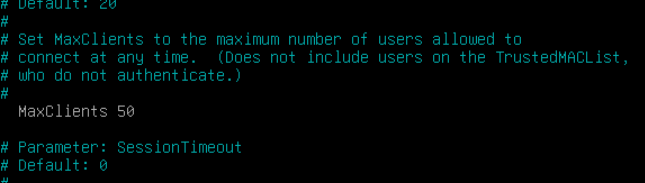
# Parameter: MaxClients
# Default: 20
#
# Set MaxClients to the maximum number of users allowed to
# connect at any time.  (Does not include users on the TrustedMACList,
# who do not authenticate.)
#
  MaxClients 50

# Parameter: SessionTimeout
# Default: 0
#
# Set the default session length in minutes. A value of 0 is for
# sessions without an end.
#

# Parameter: PreAuthIdleTimeout
# Default: 10
#
# Set PreAuthIdleTimeout to the desired number of minutes before
# an pre-authenticated user is automatically removed from the client list.
#

# Parameter: AuthIdleTimeout
# Default: 120
#
# Set AuthIdleTimeout to the desired number of minutes before
# an authenticated user is automatically 'deauthenticated'
# and removed from the client list.
#

# Parameter: CheckInterval
# Default: 30
#
# Interval in seconds (!) the timeouts of all clients are checked.
#

# Parameter: MACMechanism
# Default: block
#
# Either block or allow.
# If 'block', MAC addresses on BlockedMACList are blocked from
# authenticating, and all others are allowed.
# If 'allow', MAC addresses on AllowedMACList are allowed to
# authenticate, and all other (non-trusted) MAC's are blocked.
#
# MACMechanism block

# Parameter: BlockedMACList
# Default: none
#
# Comma-separated list of MAC addresses who will be completely blocked
# from the GatewayInterface. Ignored if MACMechanism is allow.
# N.B.: weak security, since MAC addresses are easy to spoof.
#
# BlockedMACList 00:00:DE:AD:BE:EF,00:00:C0:1D:F0:0D

# Parameter: AllowedMACList
# Default: none
#
# Comma-separated list of MAC addresses who will not be completely
# blocked from the GatewayInterface. Ignored if MACMechanism is block.
# N.B.: weak security, since MAC addresses are easy to spoof.
#
# AllowedMACList 00:00:12:34:56:78

# Parameter: TrustedMACList
# Default: none
#
# Comma-separated list of MAC addresses who are not subject to
# authentication, and are not restricted by any FirewallRuleSet.
# N.B.: weak security, since MAC addresses are easy to spoof.
#
# TrustedMACList 00:00:CA:FE:BA:BE, 00:00:C0:01:D0:0D

# Parameter: TrafficControl
# Default: no
#
# Set to yes (or true or 1), to enable traffic control in Nodogsplash.
#
# TrafficControl no

# Parameter: DownloadLimit
# Default: 0
#
# If TrafficControl is enabled, this sets the maximum download
# speed to the GatewayInterface, in kilobits per second.
# For example if you have an ADSL connection with 768 kbit
# download speed, and you want to allow about half of that
# bandwidth for the GatewayInterface, set this to 384.
# A value of 0 means no download limiting is done.
#
# DownloadLimit 384

# Parameter: UploadLimit
# Default: 0
#
# If TrafficControl is enabled, this sets the maximum upload
# speed from the GatewayInterface, in kilobits per second.
# For example if you have an ADSL connection with 128 kbit
# upload speed, and you want to allow about half of that
# bandwidth for the GatewayInterface, set this to 64.
# A value of 0 means no upload limiting is done.
#
# UploadLimit 64

# Parameter: GatewayIPRange
# Default: 0.0.0.0/0
#
# By setting this parameter, you can specify a range of IP addresses
# on the GatewayInterface that will be responded to and managed by
# Nodogsplash.  Addresses outside this range do not have their packets
# touched by Nodogsplash at all.
# Defaults to 0.0.0.0/0, that is, all addresses.
#
# GatewayIPRange 0.0.0.0/0

# Parameter: DebugLevel
# Default: 1
#
# Set the debug level:
# 0: errors only
# 1: errors, warnings, infos
# 2: errors, warnings, infos, verbose messages
# 3: errors, warnings, infos, verbose messages, debug messages
#
#  DebugLevel 1

# Parameter: BinAuth
#
# Enable BinAuth Support.
# If set, a program is called with several parameters on authentication (request) and deauthentication.
#
# Request for authentication:
#
# $<BinAuth> auth_client <client_mac> '<username>' '<password>'
#
# The username and password values may be empty strings and are URL encoded.
# The program is expected to output the number of seconds the client
# is to be authenticated. Zero or negative seconds will cause the authentification request
# to be rejected. The same goes for an exit code that is not 0.
# The output may contain a user specific download and upload limit in KBit/s:
# <seconds> <upload> <download>
#
# Called on authentication or deauthentication:
# $<BinAuth> <*auth|*deauth> <incoming_bytes> <outgoing_bytes> <session_start> <session_end>
#
# "client_auth": Client authenticated via this script.
# "client_deauth": Client deauthenticated by the client via splash page.
# "idle_deauth": Client was deauthenticated because of inactivity.
# "timeout_deauth": Client was deauthenticated because the session timed out.
# "ndsctl_auth": Client was authenticated manually by the ndsctl tool.
# "ndsctl_deauth": Client was deauthenticated by the ndsctl tool.
# "shutdown_deauth": Client was deauthenticated by Nodogsplash terminating.
#
# Values session_start and session_start are in seconds since 1970 or 0 for unknown/unlimited.
#
# BinAuth /bin/myauth.sh

# Nodogsplash uses specific HEXADECIMAL values to mark packets used by iptables as a bitwise mask.
# This mask can conflict with the requirements of other packages such as mwan3, sqm etc
# Any values set here are interpreted as in hex format.
#
# Parameter: fw_mark_authenticated
# Default: 30000 (0011|0000|0000|0000|0000 binary)
#
# Parameter: fw_mark_trusted
# Default: 20000 (0010|0000|0000|0000|0000 binary)
#
# Parameter: fw_mark_blocked
# Default: 10000 (0001|0000|0000|0000|0000 binary)
#
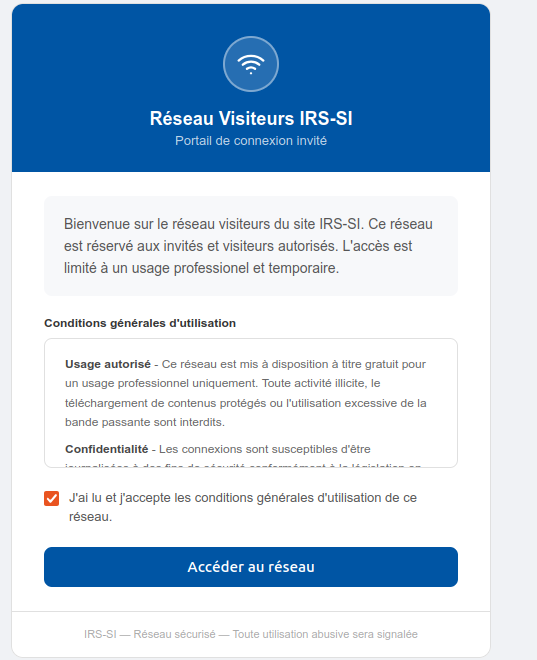
Page d'accueil du portail
La page affichée aux visiteurs est définie dans /etc/nodogsplash/htdocs/splash.html. La page par défaut fournie par NoDogSplash suffit pour les besoins du projet. Elle contient un bouton permettant au visiteur d'accepter les conditions d'utilisation et de valider son accès.
Logo
Tickets
Demandes d'ajout
Jalons
Explorer
24
KermorvantM
/
Projet-IRS
Privé
Code
Tickets26
Demandes d'ajout
Projets1
Publications
Paquets
Wiki
Activité
Actions
Paramètres
Projet-IRS
/HTML/splash.html
KermorvantM
2d33e36c6a
FEATURE: page HTML portail connexion WiFi
il y a 2 semaines
108 lignes
Pas d'EOL
6 Kio
HTML
<!DOCTYPE html>
<html lang="en">
<head>
<meta charset="UTF-8">
<meta name="viewport" content="width=device-width, initial-scale=1.0">
<title>Portail de Connexion</title>
<style>
* { box-sizing: border-box; margin: 0; padding: 0; }
body { font-family: Arial, sans-serif; background: #f0f2f5; min-height: 100vh; display: flex; align-items: center; justify-content: center; padding: 1rem; }
.portal-wrap { width: 100%; max-width: 480px; }
.portal-card { background: #ffffff; border: 1px solid #e0e0e0; border-radius: 12px; overflow: hidden; }
.portal-header { background: #0055a4; padding: 2rem 2rem 1.5rem; text-align: center; }
.logo-circle { width: 56px; height: 56px; border-radius: 50%; background: rgba(255,255,255,0.15); border: 2px solid rgba(255,255,255,0.4); display: flex; align-items: center; justify-content: center; margin: 0 auto 1rem; }
.logo-circle svg { width: 28px; height: 28px; stroke: #fff; fill: none; stroke-width: 2; stroke-linecap: round; stroke-linejoin: round; }
.portal-header h1 { font-size: 18px; font-weight: 600; color: #fff; margin: 0 0 4px; }
.portal-header p { font-size: 13px; color: rgba(255,255,255,0.75); margin: 0; }
.portal-body { padding: 1.5rem 2rem; }
.welcome-box { background: #f7f8fa; border-radius: 8px; padding: 1rem 1.25rem; margin-bottom: 1.25rem; }
.welcome-box p { font-size: 14px; color: #555; line-height: 1.6; }
.cgu-title { font-size: 12px; font-weight: 600; color: #333; margin-bottom: 8px; }
.cgu-box { border: 1px solid #e0e0e0; border-radius: 8px; padding: 1rem 1.25rem; margin-bottom: 1.25rem; max-height: 130px; overflow-y: auto; }
.cgu-box p { font-size: 12px; color: #666; line-height: 1.6; margin-bottom: 8px; }
.cgu-box p:last-child { margin-bottom: 0; }
.cgu-box strong { color: #444; }
.checkbox-row { display: flex; align-items: flex-start; gap: 10px; margin-bottom: 1.25rem; cursor: pointer; }
.checkbox-row input[type=checkbox] { margin-top: 3px; flex-shrink: 0; cursor: pointer; width: 15px; height: 15px; }
.checkbox-row label { font-size: 13px; color: #555; line-height: 1.5; cursor: pointer; }
.connect-btn { width: 100%; padding: 11px; background: #0055a4; color: #fff; border: none; border-radius: 8px; font-size: 15px; font-weight: 600; cursor: not-allowed; opacity: 0.4; transition: opacity 0.2s, background 0.2s; }
.connect-btn.active { opacity: 1; cursor: pointer; }
.connect-btn.active:hover { background: #004080; }
.portal-footer { padding: 1rem 2rem; border-top: 1px solid #e0e0e0; text-align: center; }
.portal-footer p { font-size: 11px; color: #aaa; }
</style>
</head>
<body>
<div class="portal-wrap">
<div class="portal-card">
<div class="portal-header">
<div class="logo-circle">
<svg viewBox="0 0 24 24">
<path d="M5 12.55a11 11 0 0 1 14.08 0" />
<path d="M1.42 9a16 16 0 0 1 21.16 0" />
<path d="M8.53 16.11a6 6 0 0 1 6.95 0" />
<circle cx="12" cy="20" r="1" fill="#fff" stroke="none" />
</svg>
</div>
<h1>Réseau Visiteurs IRS-SI</h1>
<p>Portail de connexion invité</p>
</div>
<div class="portal-body">
<div class="welcome-box">
<p>Bienvenue sur le réseau visiteurs du site IRS-SI. Ce réseau est réservé aux invités et visiteurs
autorisés. L'accès est limité à un usage professionel et temporaire.</p>
</div>
<p class="cgu-title">Conditions générales d'utilisation</p>
<div class="cgu-box">
<p><strong>Usage autorisé</strong> - Ce réseau est mis à disposition à titre gratuit pour un usage
professionnel uniquement. Toute activité illicite, le téléchargement de contenus protégés ou
l'utilisation excessive de la bande passante sont interdits.</p>
<p><strong>Confidentialité</strong> - Les connexions sont susceptibles d'être journalisées à des
fins de sécurité conformément à la législation en vigueur.</p>
<p><strong>Responsabilité</strong> - L'établissement décline toute responsabilité quant aux dommages
pouvant résulter de l'utilisation de ce réseau. L'utilisateur est seul responsable de l'usage
qu'il fait de cette connexion.</p>
<p><strong>Durée</strong> - L'accès est accordé pour la durée de votre visite. La session peut être
interrompue à tout moment par l'administrateur réseau.</p>
</div>
<div class="checkbox-row">
<input type="checkbox" id="cgu-check" onchange="toggleBtn(this)">
<label for="cgu-check">J'ai lu et j'accepte les conditions générales d'utilisation de ce
réseau.</label>
</div>
<form method="get" action="$authaction">
<input type="hidden" name="tok" value="$tok">
<input type="hidden" name="redir" value="$redir">
<button type="submit" class="connect-btn" id="connect-btn" disabled>
Accéder au réseau
</button>
</form>
</div>
<div class="portal-footer">
<p>IRS-SI — Réseau sécurisé — Toute utilisation abusive sera signalée</p>
</div>
</div>
</div>
<script>
function toggleBtn(cb) {
var btn = document.getElementById('connect-btn');
btn.disabled = !cb.checked;
if (cb.checked) {
btn.classList.add('active');
} else {
btn.classList.remove('active');
}
}
</script>
</body>
</html>
Propulsé par Forgejo
Version: 12.0.1 Page:
151ms
Modèle:
10ms
Licences
API